
MongoDB® Atlas and ScaleGrid for MongoDB® offer two distinct approaches to running MongoDB® in the cloud. Both support high-performance, data-driven applications — but which one fits your use case best?
While MongoDB® Atlas delivers a fully managed experience tied closely to MongoDB®’s ecosystem, ScaleGrid mostly matches Atlas capabilities while also being attractive for organizations with complex deployment needs, strict compliance requirements, or those optimizing for performance and budget.
This article compares their core differences across flexibility, pricing, and deployment control to help you decide which solution aligns with your technical and operational needs.
To address the elephant in the room, this may seem self-serving, writing a comparison of ScaleGrid versus the competition on the ScaleGrid website. That’s why we contracted a 3rd party to research and review both platforms. We look forward to sharing their findings in this article.
Providers Overview
MongoDB®
The company behind the development of MongoDB® offers the official cloud service tailored for usability, simplicity, and rapid deployment. MongoDB® Atlas serves as the central SaaS platform for managing database clusters, collections, and documents. Users can upload their JSON files through two primary methods:
| MongoDB® Compass: | Its desktop program available on Windows, MacOS, and Linux |
| MongoDB® Shell: | Its command-line interface based on JavaScript |
Basic users can upload data manually using Compass, while advanced users may prefer using Shell to automate bulk uploads. However, optimizing performance and managing costs remain the user’s responsibility. Although a limited free plan exists, the paid enterprise-grade options charge per hour, requiring constant monitoring of usage and traffic to control expenses.
Lack of control over cloud provisioning forces all users to operate within a shared environment without access to dedicated hosting. This restriction leads to the “noisy neighbor” issue, where high-traffic customers degrade network performance for others. This limitation affects everything from speed to the number of connections users’ databases can maintain.
ScaleGrid
ScaleGrid, a Database-as-a-Service (DBaaS) provider, offers fully managed solutions for multiple database formats, including MySQL, PostgreSQL, Redis, MongoDB® , and RabbitMQ. It emphasizes customization, control, and flexibility, allowing existing users to migrate their instances seamlessly.
The primary product is management software that automatically monitors and maintains databases. Its premium offering includes hands-on professional management and optimization.
ScaleGrid offers two options:
| Dedicated Hosting: | Expert database administration that includes cloud virtual machine instance optimization, network data transfer, and disk backup at a flat monthly premium, as opposed to MongoDB® Atlas’s variable pricing. |
| Bring Your Own Cloud
(BYOC): |
The same concierge services but allowing the customer to procure, provision, and customize their own database cloud environment for a lower monthly fee. |
ScaleGrid supports a broader range of cloud service providers, including Amazon Web Services, Google Cloud Platform, Microsoft Azure, Digital Ocean, Linode, Oracle Cloud Infrastructure, and Zadara. These platforms can be provisioned directly by ScaleGrid or supplied by the user. This flexibility allows small and medium-sized businesses (SMBs) to avoid the complexities of cloud database management while enabling large enterprises with dedicated IT teams to reduce overhead costs through a flat monthly fee structure.
Private cloud environments eliminate the “noisy neighbor” issue, making ScaleGrid ideal for big data use cases like IoT. MongoDB® Atlas imposes connection limits on databases, while ScaleGrid users with dedicated cloud environments can scale as needed.
ScaleGrid also supports legacy MongoDB® versions, accommodating customers with strict regulatory requirements that prevent upgrades—something MongoDB® Atlas enforces. This feature benefits industries such as government, infrastructure, construction, and banking. Additionally, startups and innovation-focused organizations can concentrate on their core business activities while outsourcing database management.
Ease of Setup and Deployment
A streamlined setup process minimizes development time and complexity. Rapid database deployment allows developers to focus on product development and innovation, while complicated setups can delay projects and increase risks for teams lacking database expertise.
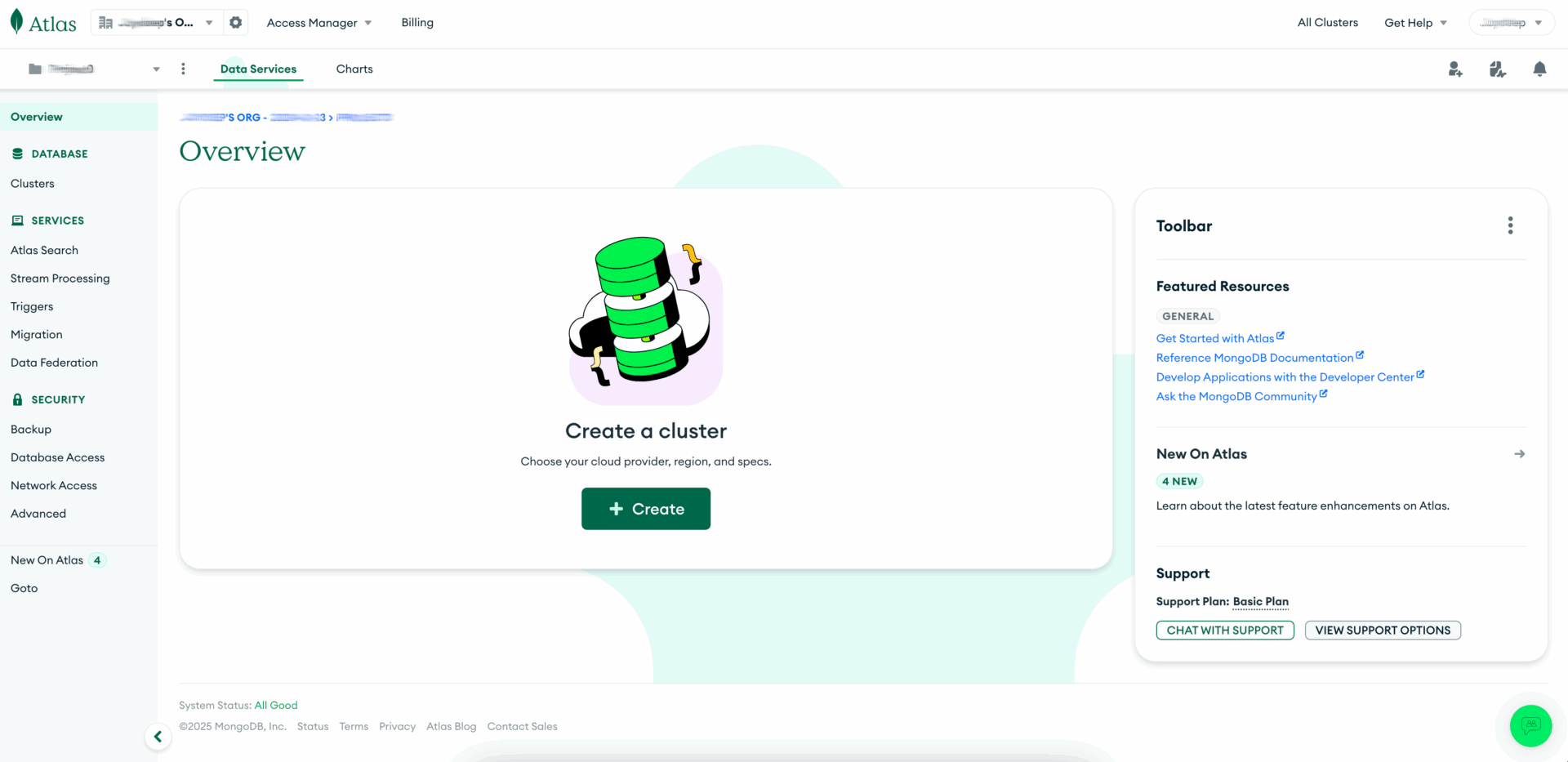
MongoDB® Atlas Cluster Creation
Creating a cluster in MongoDB® Atlas requires an additional step—creating a New Project—before proceeding.
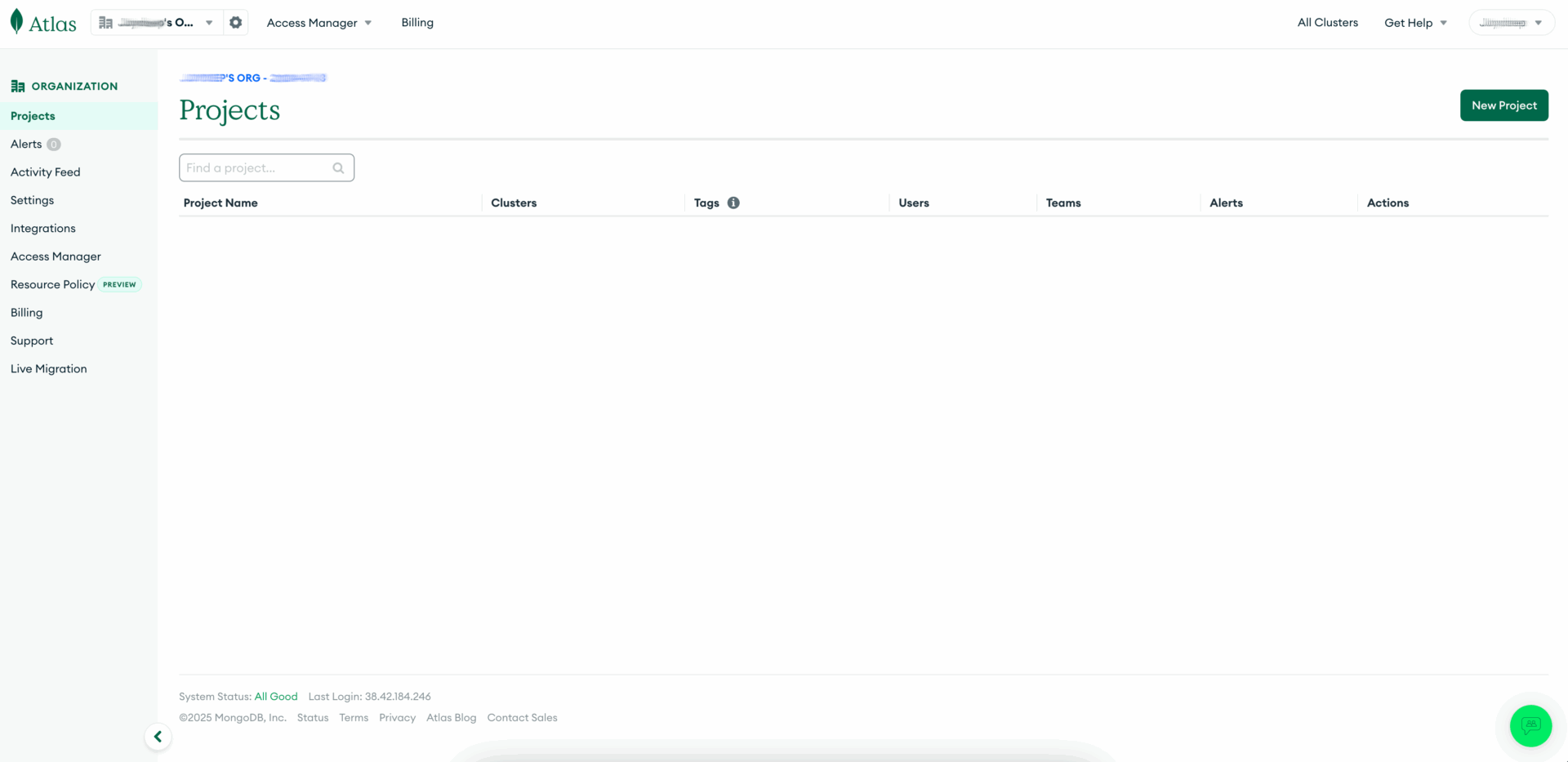
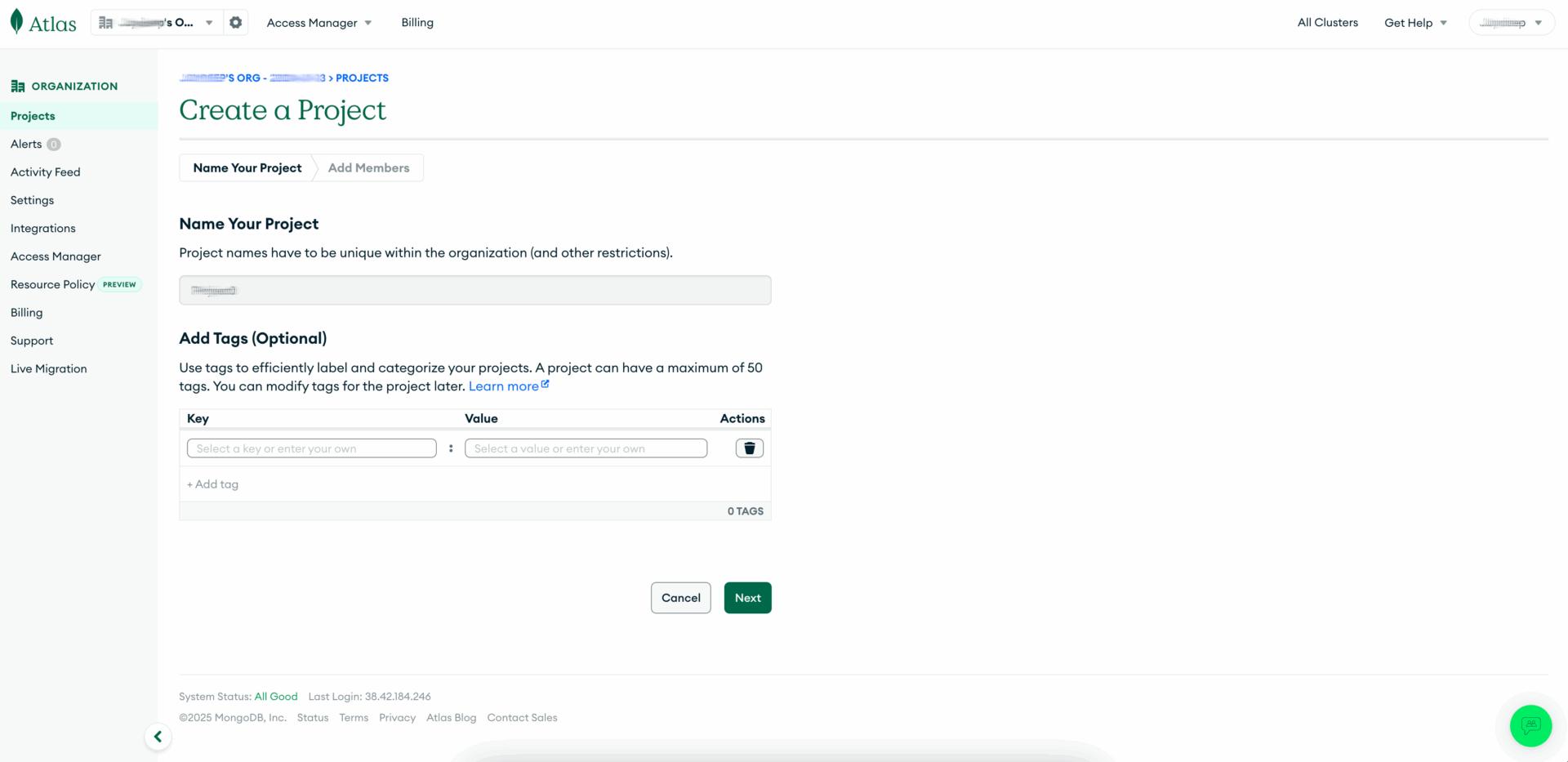
Moreover, this is a two-step process, with the first being to name it and apply optional tags.
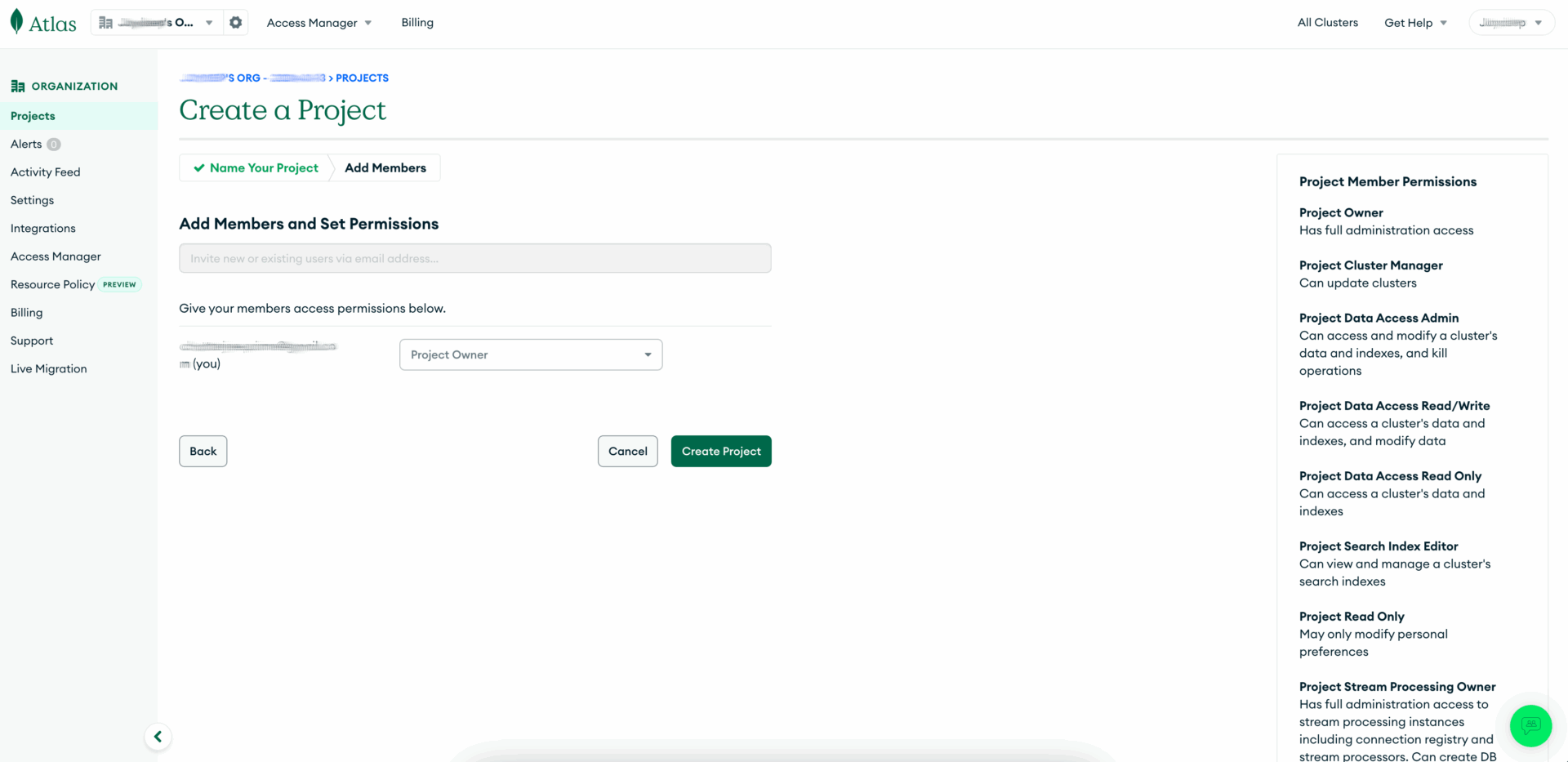
Then, members must be added, and permissions need to be set before the Project can finally be created.
Only after a New Project is created can a New Cluster be created.
There are three tiers of options, with a permanent Free one allowing 512 MB of storage with shared RAM and vCPU compute. While there are paid options Flex (5 GB of storage with shared RAM and vCPU compute for 1.1 cents per hour) and M10 (10 GB of storage with 2 GB RAM and 2 vCPUs compute for 8 cents per hour), they are limited and without any cost limits due to their variable nature.
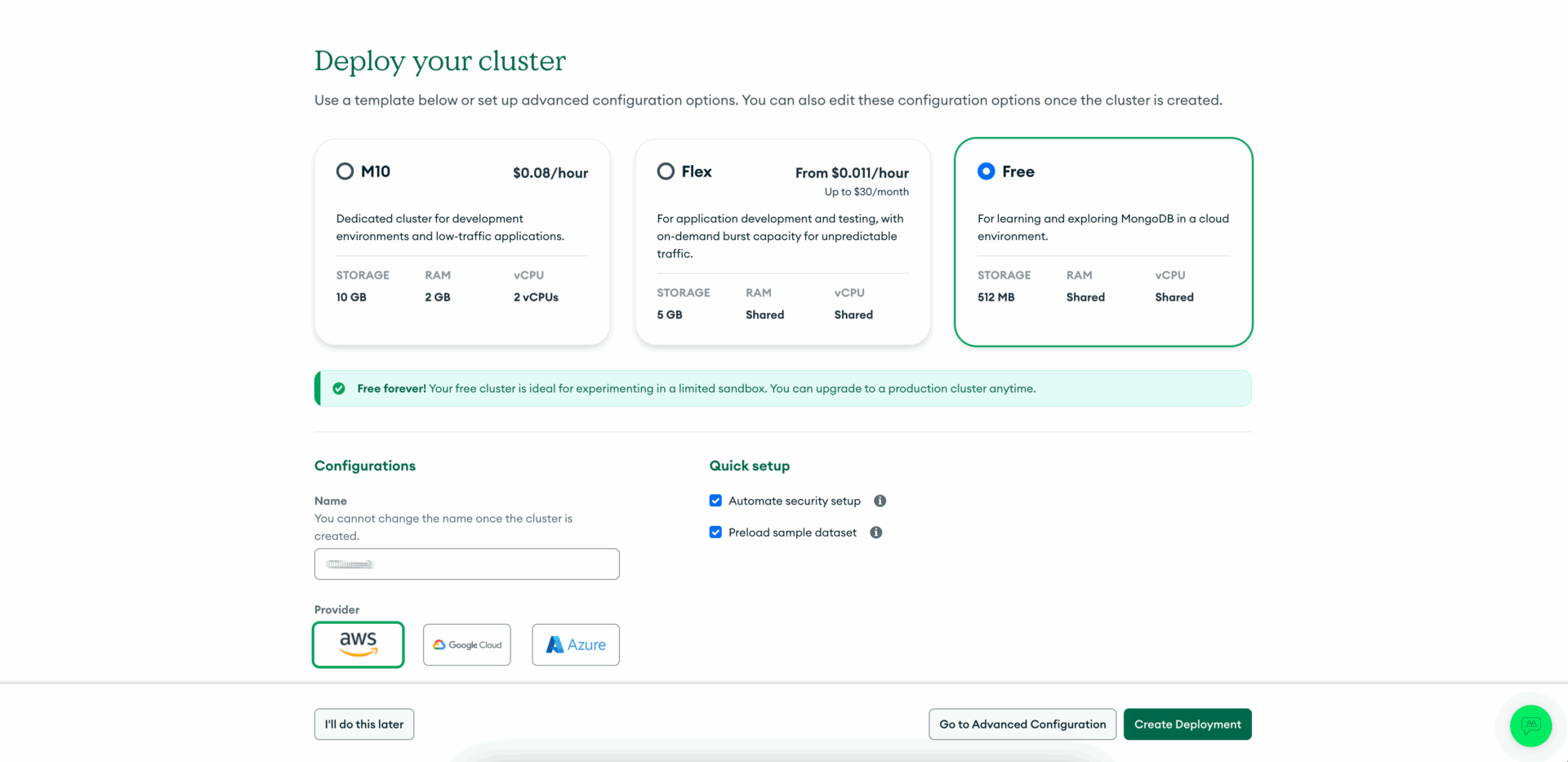
Also, only three cloud service options (Amazon Web Services, Google Cloud Platform, and Microsoft Azure) are available.
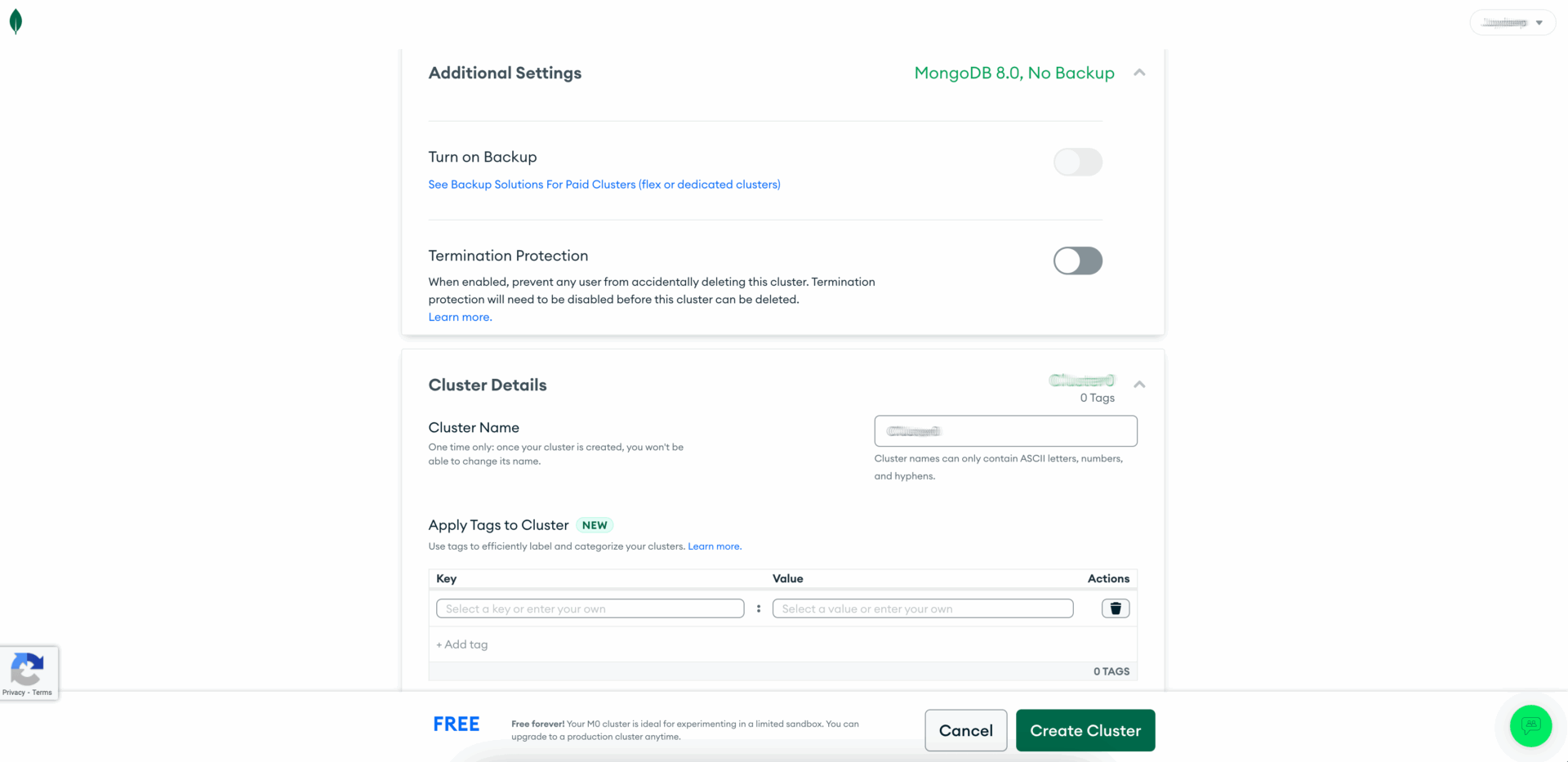
Although Termination Protection is offered for the Free tier, only the Paid options (Flex and M10) have Backup. There is also the option to apply Tags to the clusters.
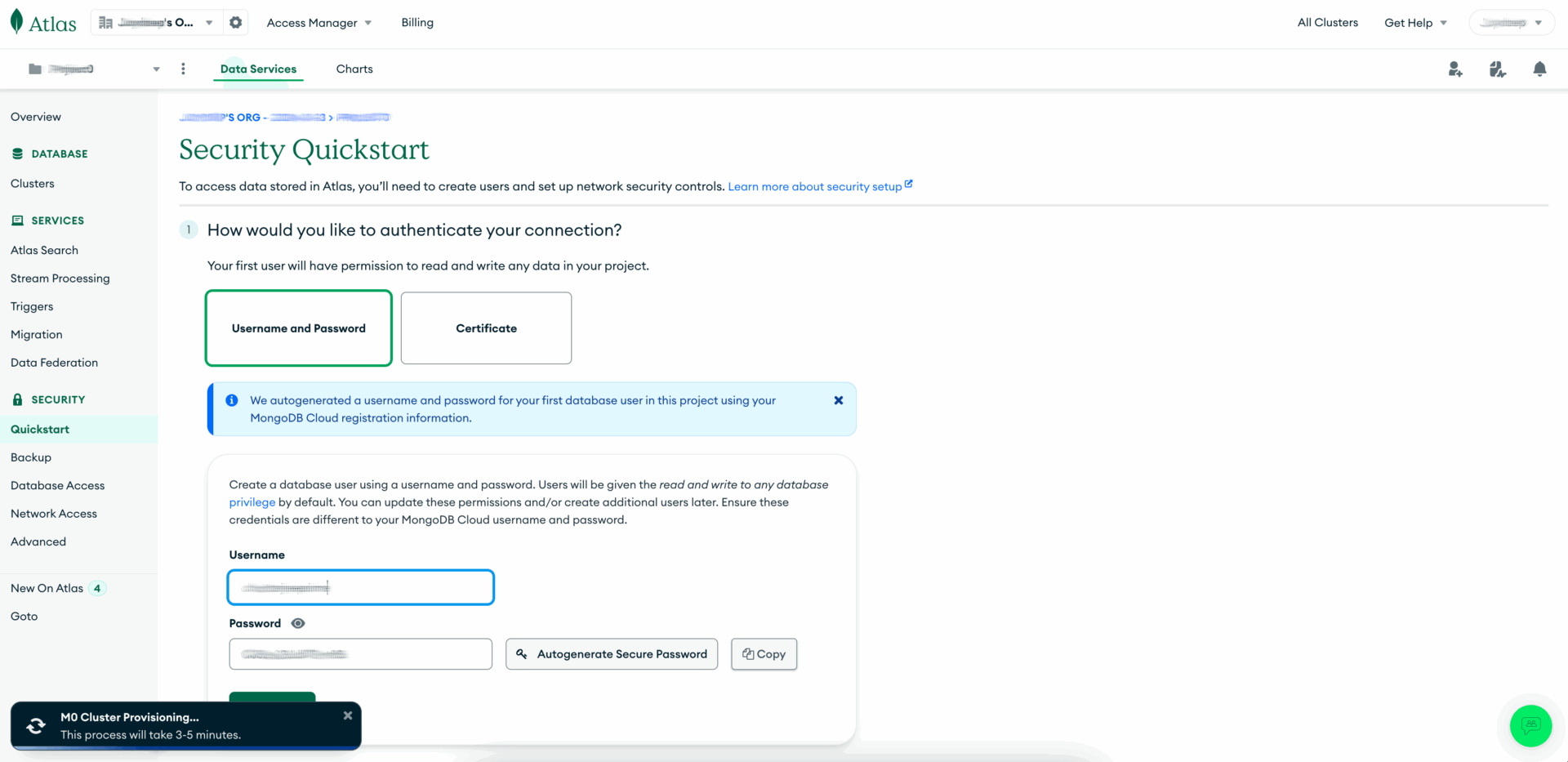
An additional Security Quickstart step needs to be implemented to either allow a Username/Password authentication of digital Certificate, on top of specifying Members and their respective Permissions in the Project that the Cluster needs to be created in.
Just before it finally seems that the Cluster is ready to deploy, MongoDB® Atlas asks for the user’s IP Address to be added for even the Members and Permissions for the Project as well as Security Quickstart for the Cluster to even allow access.
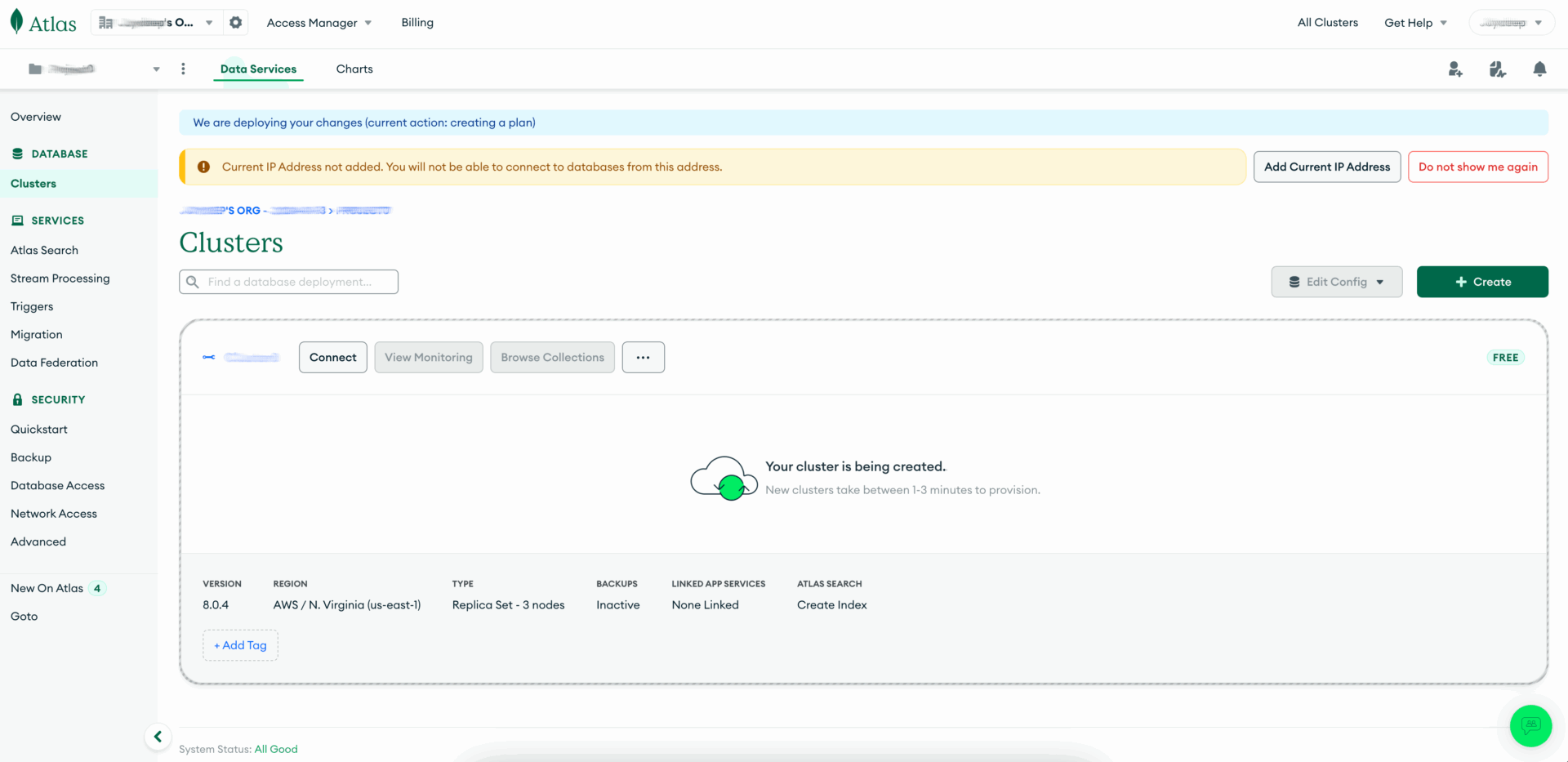
Finally, the cluster is created after multiple layers of authentication and complexity.

Lastly, Collections can be added to the Database, but only through MongoDB® Compass or MongoDB® Shell.
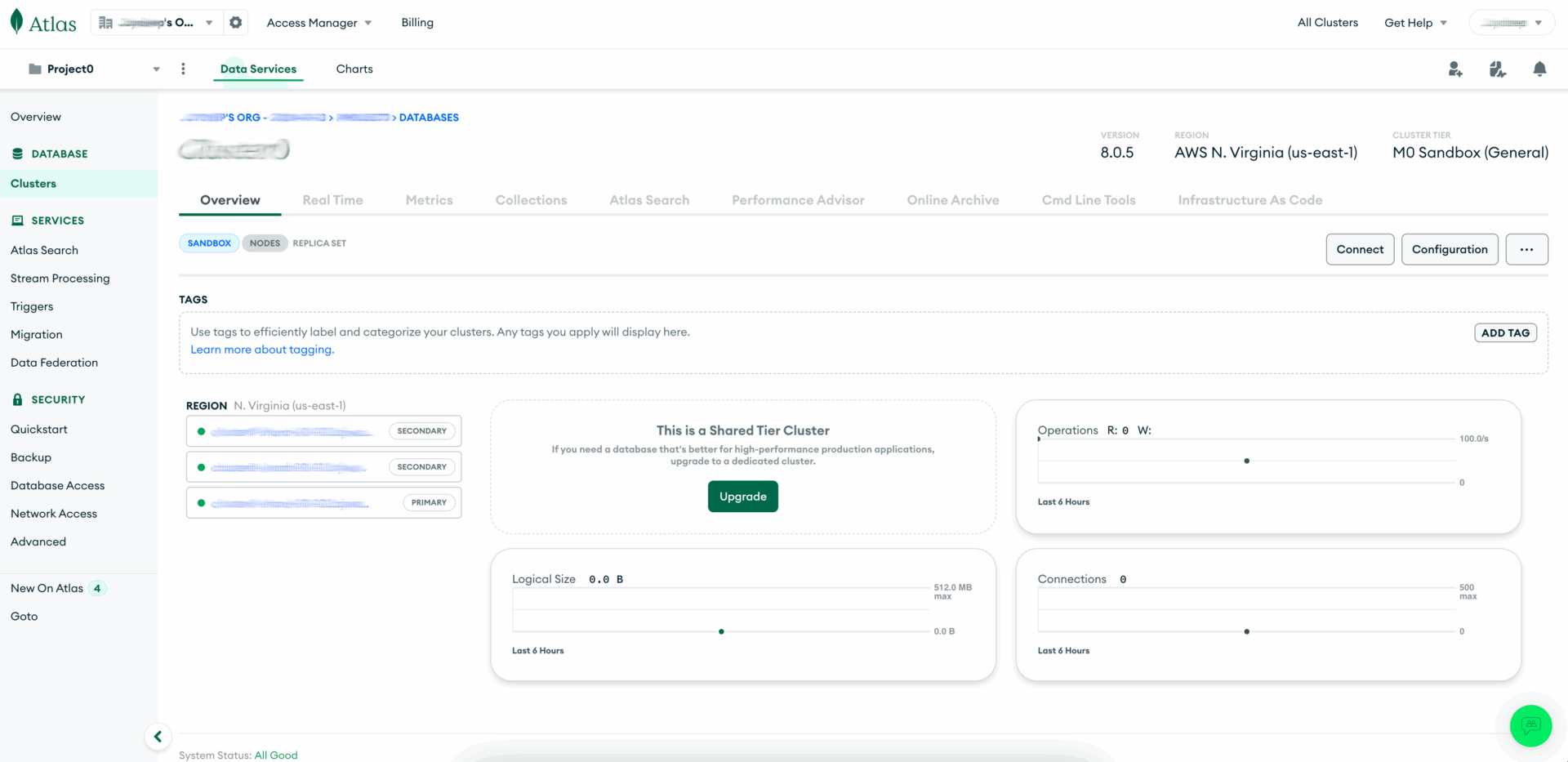
As you can see, there are too many layers of security authentication at this step.
ScaleGrid for MongoDB® Cluster Creation
Without any need to Create New Project as with MongoDB® Atlas, simply select your preferred database type and cloud service (documentation).

Although only the Micro option is available for the 7-Day Trial, it allows the user to experience service with 10 GB storage with 1 GB RAM and 2 vCPU compute power. The user can choose between the fully managed Dedicated Hosting or partially managed Bring Your Own Cloud (BYOC) option.

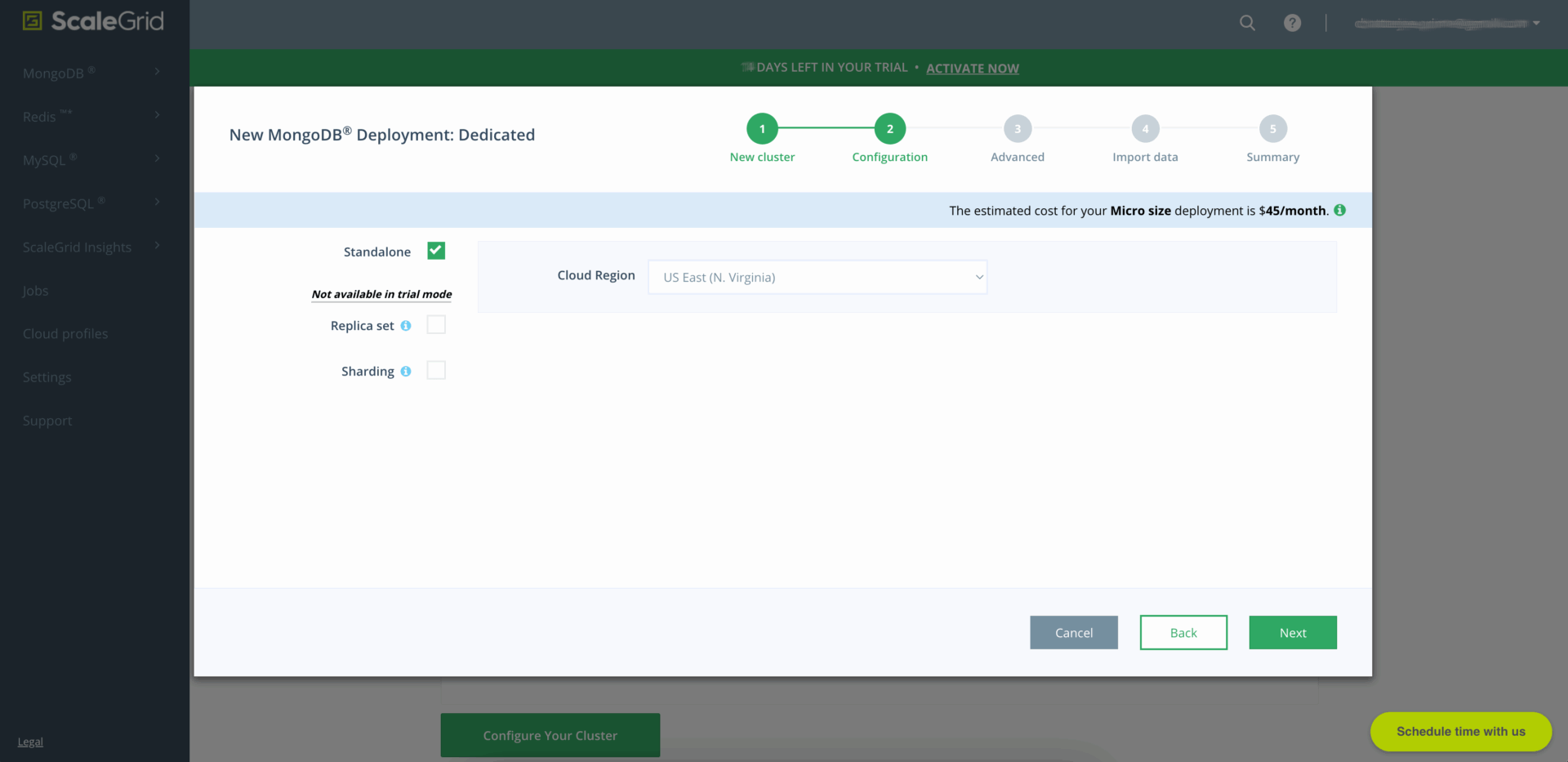
The Cluster can be a Standalone (for maximum performance) or Replica set (for increased scalability), with the Sharding option available as well.
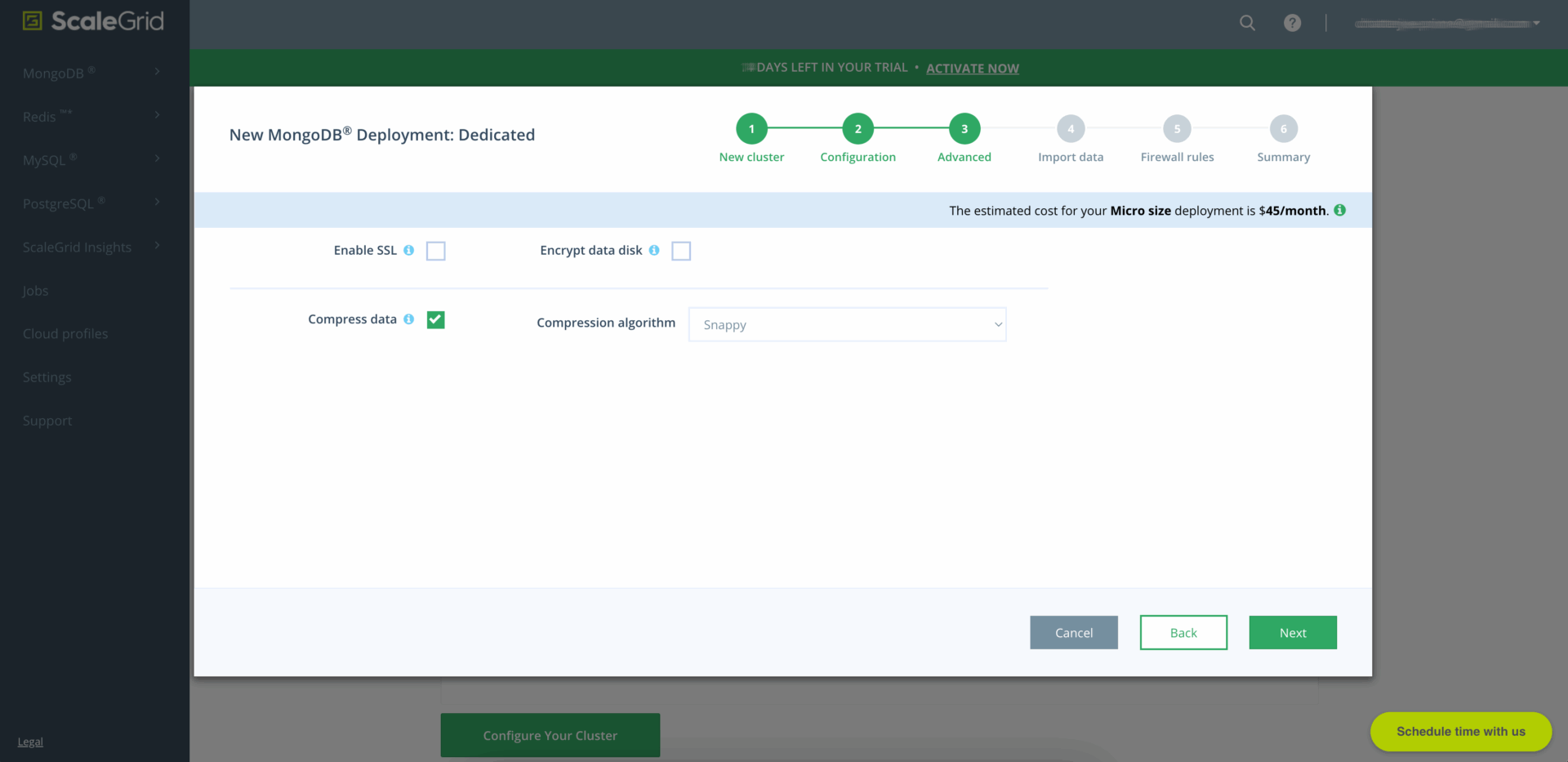
Advanced options such as Secure Socket Layer (SSL) and the encryption and compression of data can be selected at this step.
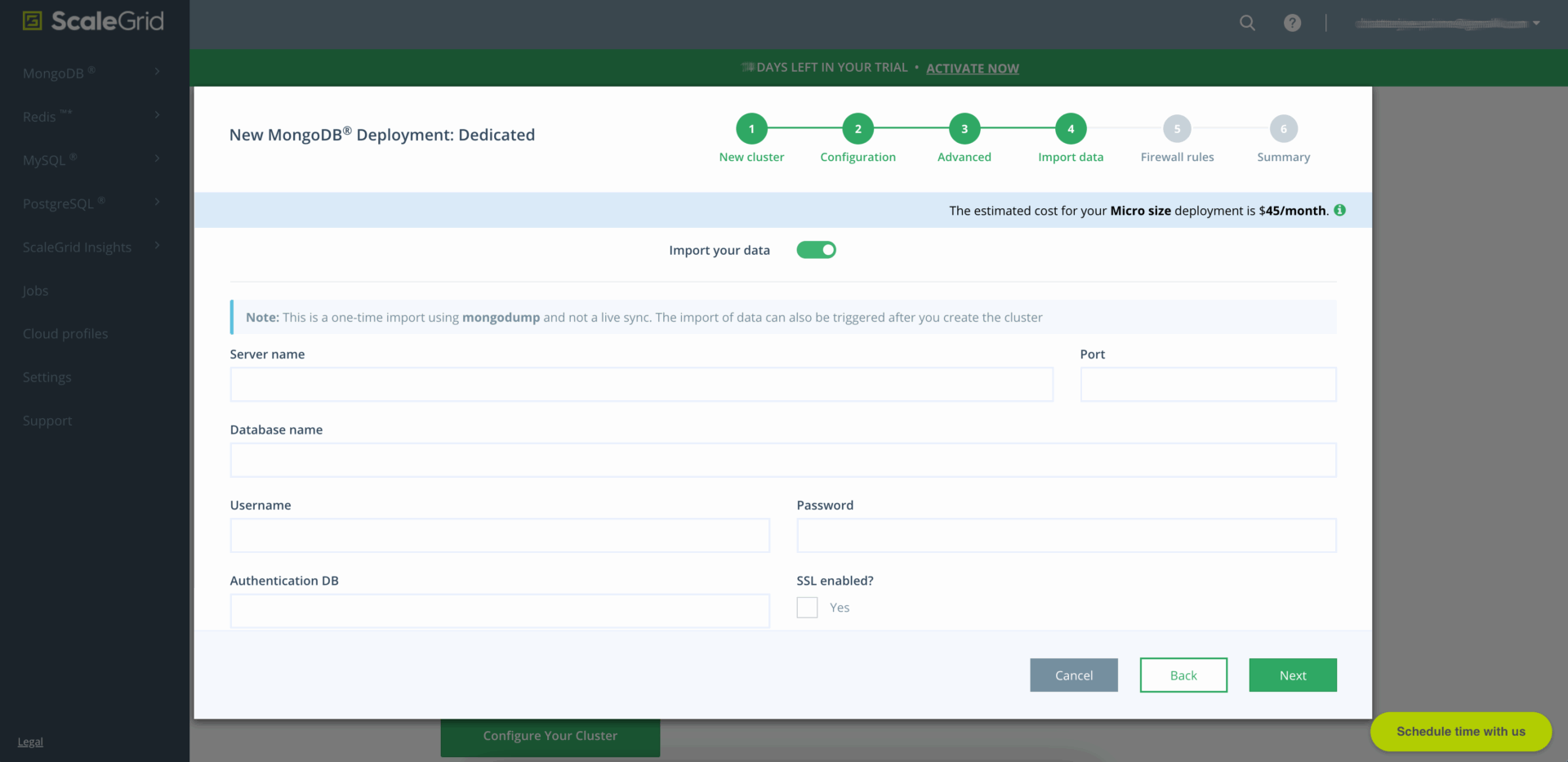
The advantage of ScaleGrid is that data can be imported while the Cluster is created. However, at this step, it can only be migrated from another existing MongoDB® server. Nevertheless, even if this step is skipped, the user can still execute a data import or request ScaleGrid’s technical support to manage that process on their behalf.
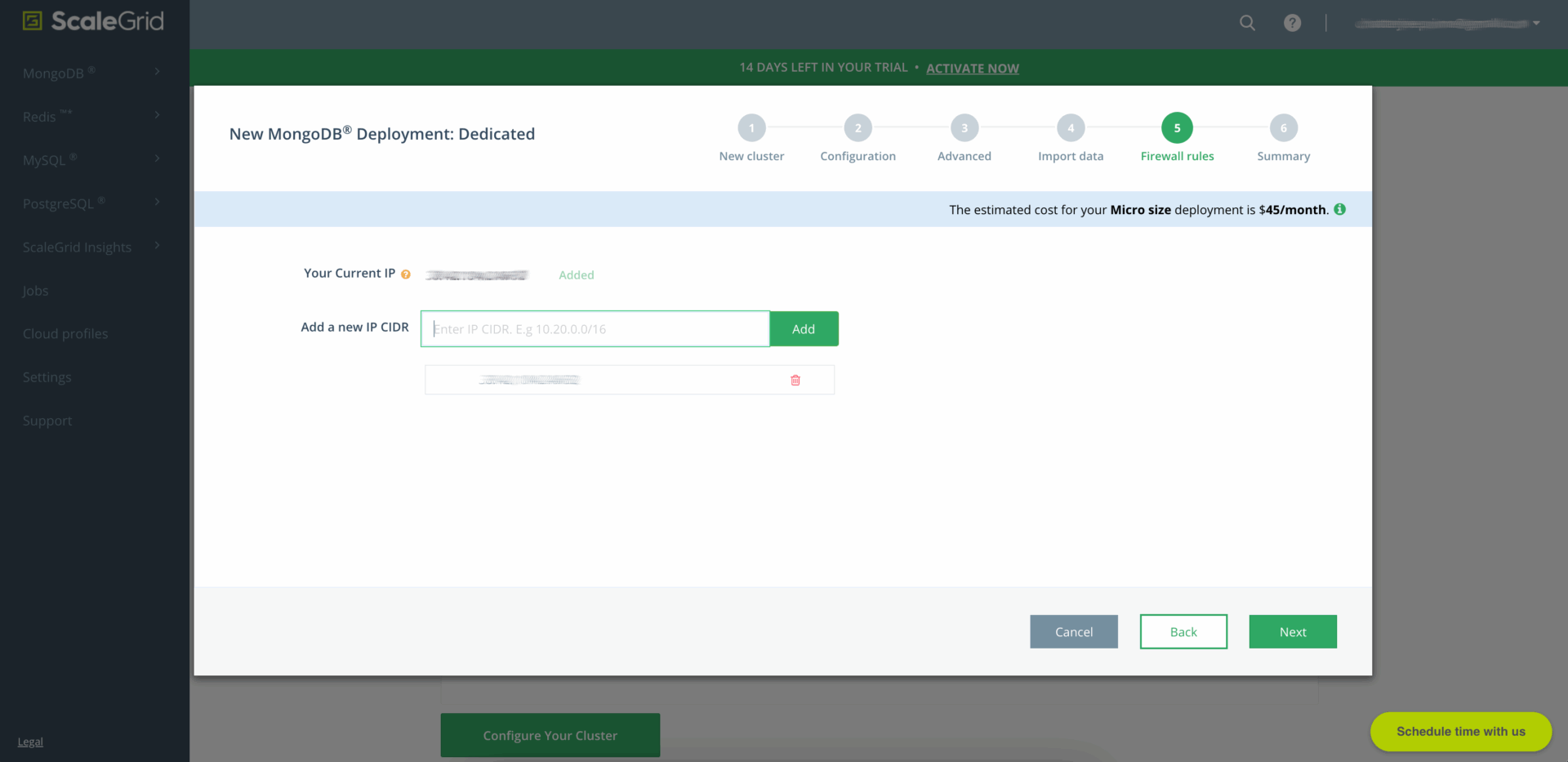
The user’s IP address needs to be added at this step, but at least that is the only layer of authentication required to allow the Cluster to be created.
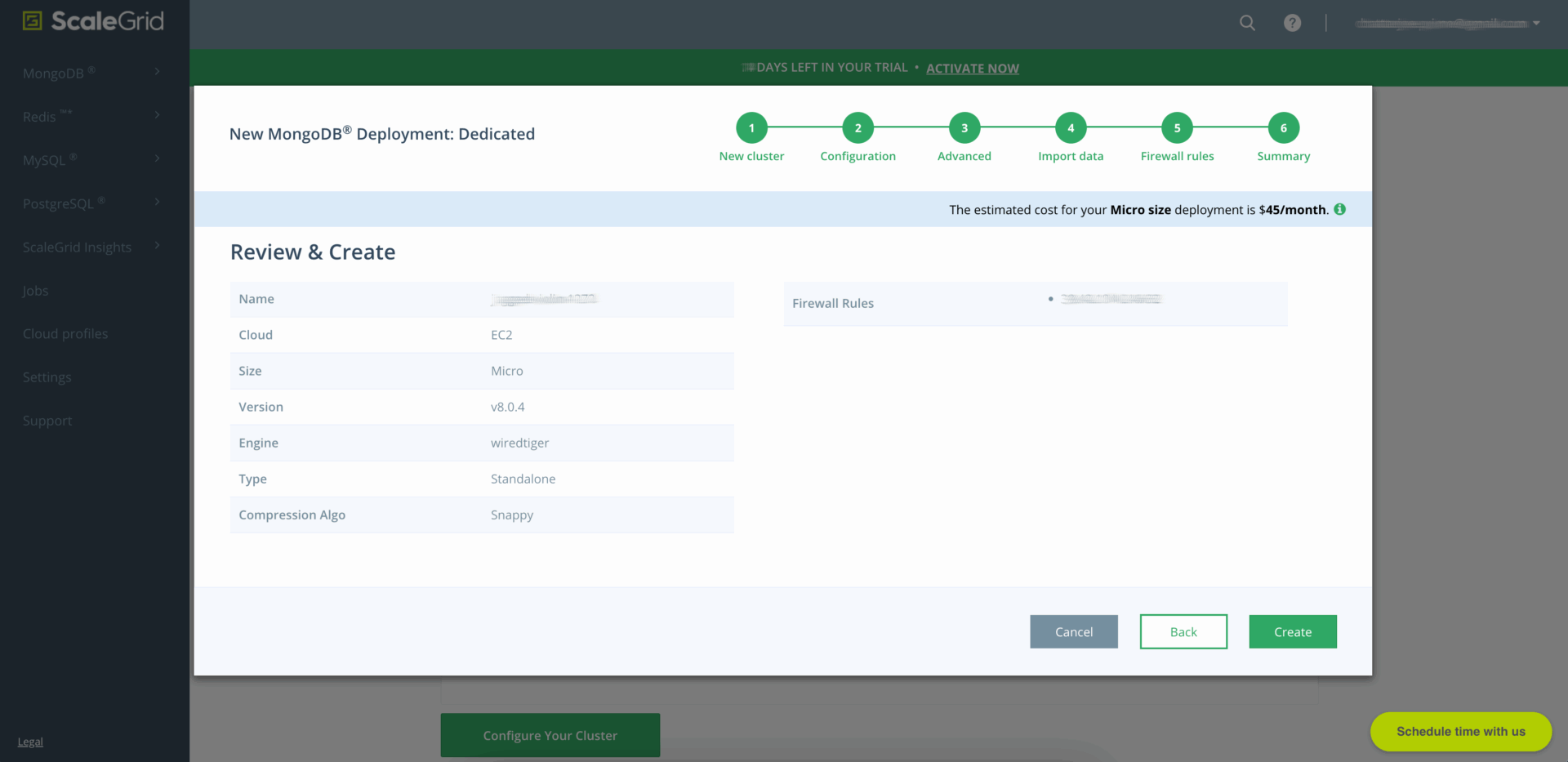
The user can now review the options before finalizing the creation of the Cluster.
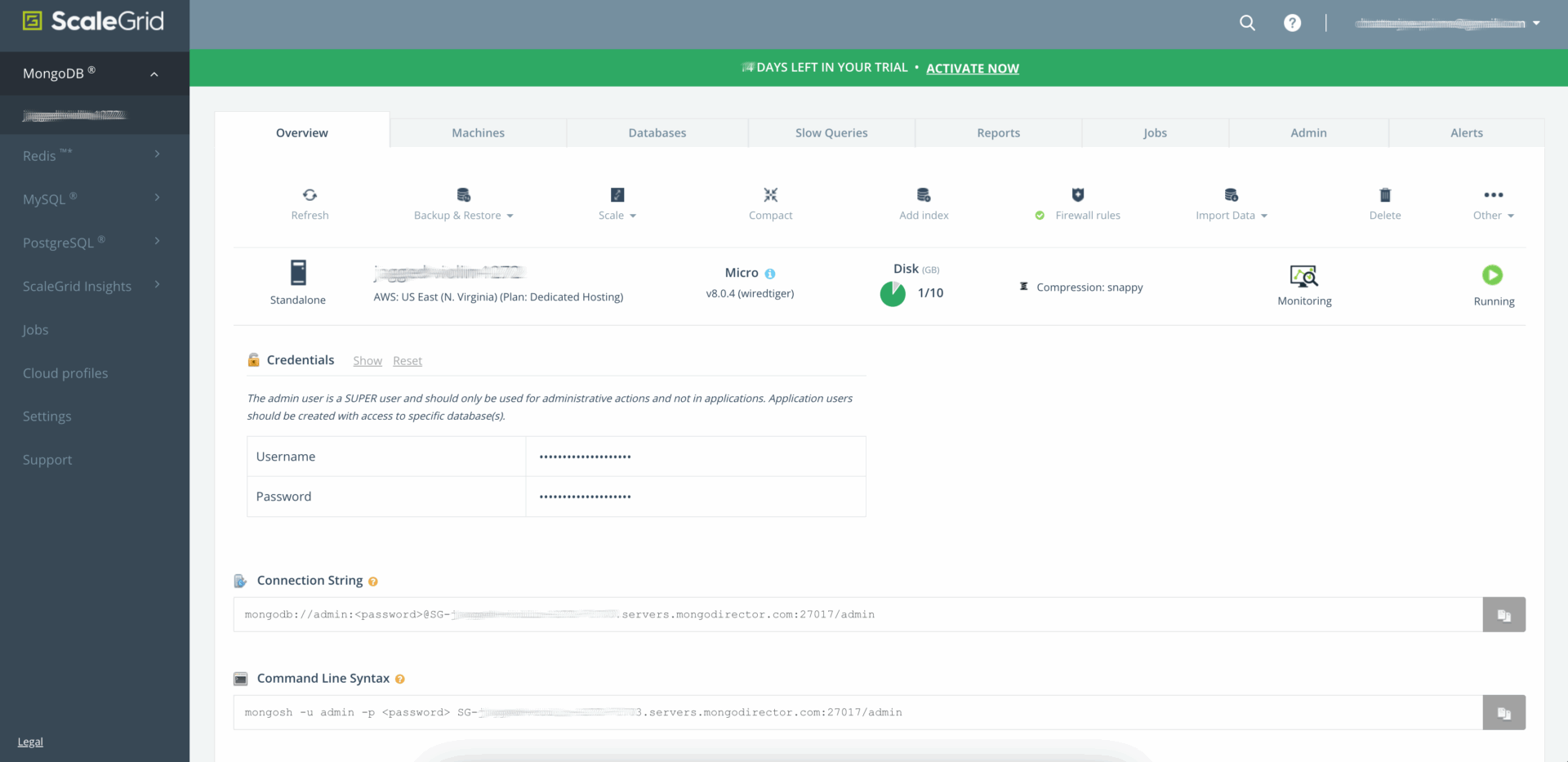
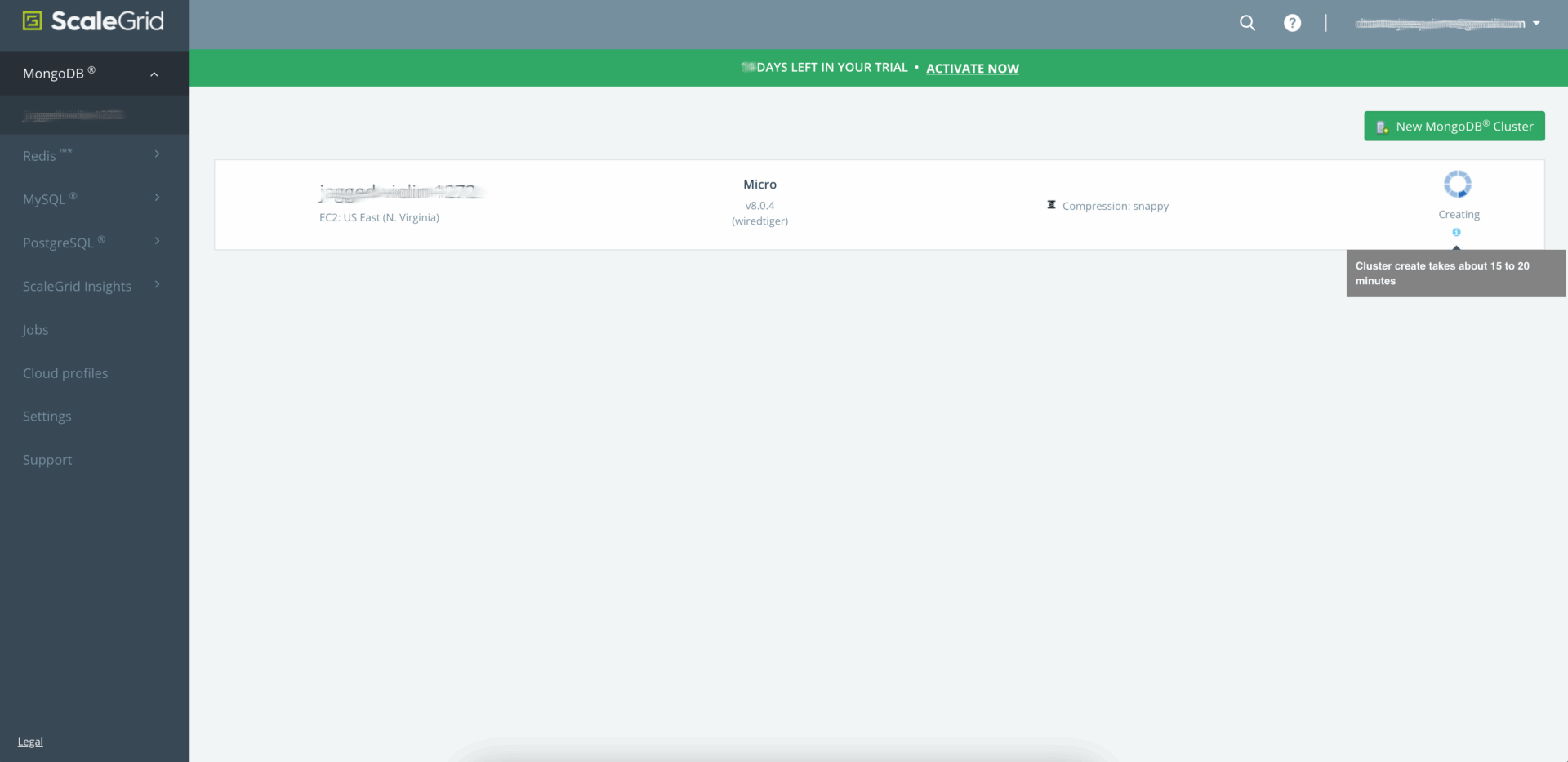
After 15 – 20 minutes, the Cluster is finally deployed and ready for use.
Comparison
ScaleGrid’s streamlined setup wizard for MongoDB® provides a quick and efficient way to launch a cluster with minimal initial configuration. Users can easily customize, import, or modify data afterward. Additionally, ScaleGrid’s managed service offers further support when needed.
To summarize the differences between the two:
| Step | MongoDB® Atlas
(Self-Service) |
ScaleGrid for MongoDB®
(Fully Managed) |
Winner |
| Initial Setup | Manual configuration of regions, instance size, storage, and networking details. | Guided setup with smart defaults and intuitive user interface. | ScaleGrid:
Simplicity with configuration options. |
| Cluster Configuration | Manual configuration of sharding, replica sets, and backups. | Automated and optimized cluster configuration and deployment with managed replica sets and automatic backups. | ScaleGrid:
Easier to set up and configure. |
Although MongoDB® Atlas is suited for rapidly prototyping databases with its permanent Free tier, ScaleGrid for MongoDB® is the ideal choice for ultimately deploying it for production.
Management and Maintenance
Effective database management directly influences operational efficiency. Managed platforms that automate tasks like patching, updating, scaling, and performance tuning allow teams to focus resources on strategic initiatives. In contrast, databases requiring constant manual management drive up costs, increase overhead, and raise the risk of errors.
| Feature | MongoDB® Atlas
(Self-Service) |
ScaleGrid for MongoDB®
(Fully Managed) |
Winner |
| Patching & Updates | Although updates can be triggered within the platform interface, the responsibility rests on the user. | Routine tasks such as applying patches, minor version upgrades, and security updates automated. | ScaleGrid:
Avoids mistakes and saves time. |
| Scaling & Optimization | User must manually monitor performance and decide when and how to scale resources up and down or horizontally via sharding. | Performance optimization and resource scaling (both vertical and horizontal) proactively managed. | ScaleGrid:
Lower risk of downtime due to traffic. |
| Maintenance Windows & Downtime | Maintenance windows and downtime must be scheduled and managed by user. | Maintenance and updates transparently coordinated. | ScaleGrid:
Downtime minimized. |
ScaleGrid’s fully managed approach minimizes complexity, overhead, and risk, providing a clear advantage for teams prioritizing simplicity, reliability, and efficiency. In contrast, MongoDB® Atlas’s self-service model appeals to organizations preferring detailed control but demands higher operational effort and investment.
Backups, Disaster Recovery, and Security
Reliable backups and disaster recovery plans ensure data protection and business continuity. Automated backups, secure storage, and rapid recovery capabilities reduce downtime risks. Integrated security features like encryption, auditing, and compliance safeguards prevent breaches and protect sensitive data, lowering operational risks and liability.
| Feature | MongoDB® Atlas
(Self-Service) |
ScaleGrid for MongoDB®
(Fully Managed) |
Winner |
| Backup & Disaster Recovery | Snapshot backups, point-in-time restores, retention, and cross-region replication must be manually enabled and configured. | Automatic back-ups, point-in-time recovery, simplified disaster recovery, and backup storage management. | ScaleGrid:
Lower risk of data loss. |
| Security | Encryption, authentication and authorization, and auditing and compliance protocols must be manually configured by user. | Comprehensive encryption by default, managed security updates, and compliance and auditing features integrated. | ScaleGrid:
Lower risk of vulnerability. |
MongoDB® Atlas offers robust and flexible backup, disaster recovery, and security features, but demands significant administrative oversight. ScaleGrid’s fully managed approach simplifies these essential tasks, providing immediate benefits like reduced complexity, lower risk, and enhanced reliability.
Monitoring and Alerts
Proactive monitoring maintains database health, performance, and reliability. Integrated monitoring tools detect issues early, preventing critical failures, reducing downtime, and improving user experience. Manual or poorly integrated monitoring increases administrative burden and the likelihood of undetected problems.
| Feature | MongoDB® Atlas
(Self-Service) |
ScaleGrid for MongoDB®
(Fully Managed) |
Winner |
| Alert Configuration | Although needs to be configured manually, provides flexibility to define custom thresholds and alerts. | Automated proactive alerting with custom thresholds and minimal required configuration. | Tie:
Tailoring vs. automation. |
| Monitoring Dashboards & Insights | Comprehensive integrated dashboards with detailed metrics. | Intuitive dashboards with integrated guidance. | Tie:
Fine-tuning vs. simplicity. |
| Integration with Third-Party Tools | Extensive support for external tools (e.g. Datadog), although requiring user configuration and management. | Limited need for external integrations due to integrated monitoring capabilities. | Atlas:
Additional capabilities possible. |
MongoDB® Atlas offers extensive customization and granular monitoring controls but demands higher operational effort and maintenance. This approach suits organizations with the resources to manage complex setups internally. ScaleGrid, by contrast, caters to those prioritizing simplicity, low administrative overhead, and built-in proactive monitoring, even if it means less customization in monitoring tools and integrations.
Performance and Scalability
Consistent performance under varying workloads is essential. Databases with automated performance tuning, load balancing, and scalable architecture adapt smoothly to rising user demand or expanding data volumes. Platforms lacking this flexibility risk performance bottlenecks, which can harm user satisfaction and hinder business growth.
| Feature | MongoDB® Atlas
(Self-Service) |
ScaleGrid for MongoDB®
(Fully Managed) |
Winner |
| Performance | Although users need to analyze query performance, index efficiency, storage optimization, and resource utilization manually; they are provided insights by an integrated feature known as the Performance Advisor, which suggests indexes and optimizations. | Experts not only provide recommendations but also manage indexing strategies, caching mechanisms, and query optimization proactively to maximize performance with minimal user intervention. | Tie:
More control vs. simplicity. |
| Scalability | Although rich customization of scaling clusters (e.g. sharding, rebalancing) and options for their advanced configuration (e.g. sizing, distribution, replication) are provided; significant user input, expertise, and ongoing adjustments are required. | One-click vertical and horizontal scaling managed with minimal user input and configuration. | Tie:
More control vs. simplicity. |
MongoDB® Atlas offers extensive flexibility, control, and customization but at the cost of higher complexity, operational overhead, and administrative demands. This approach suits teams with strong database management expertise and resources to maintain performance at scale.
ScaleGrid’s automated, professionally managed performance tuning and seamless scalability appeal to organizations seeking reduced operational overhead and complexity. However, it limits granular customization for those preferring manual optimization and precise control over database resources.
Technical Support and Customer Service
Effective technical support minimizes troubleshooting time and costs. Providers with responsive, expert-driven assistance help maintain database reliability and ensure business continuity. Inadequate or limited support leads to extended downtime, higher stress, and potential revenue loss.
MongoDB® Atlas
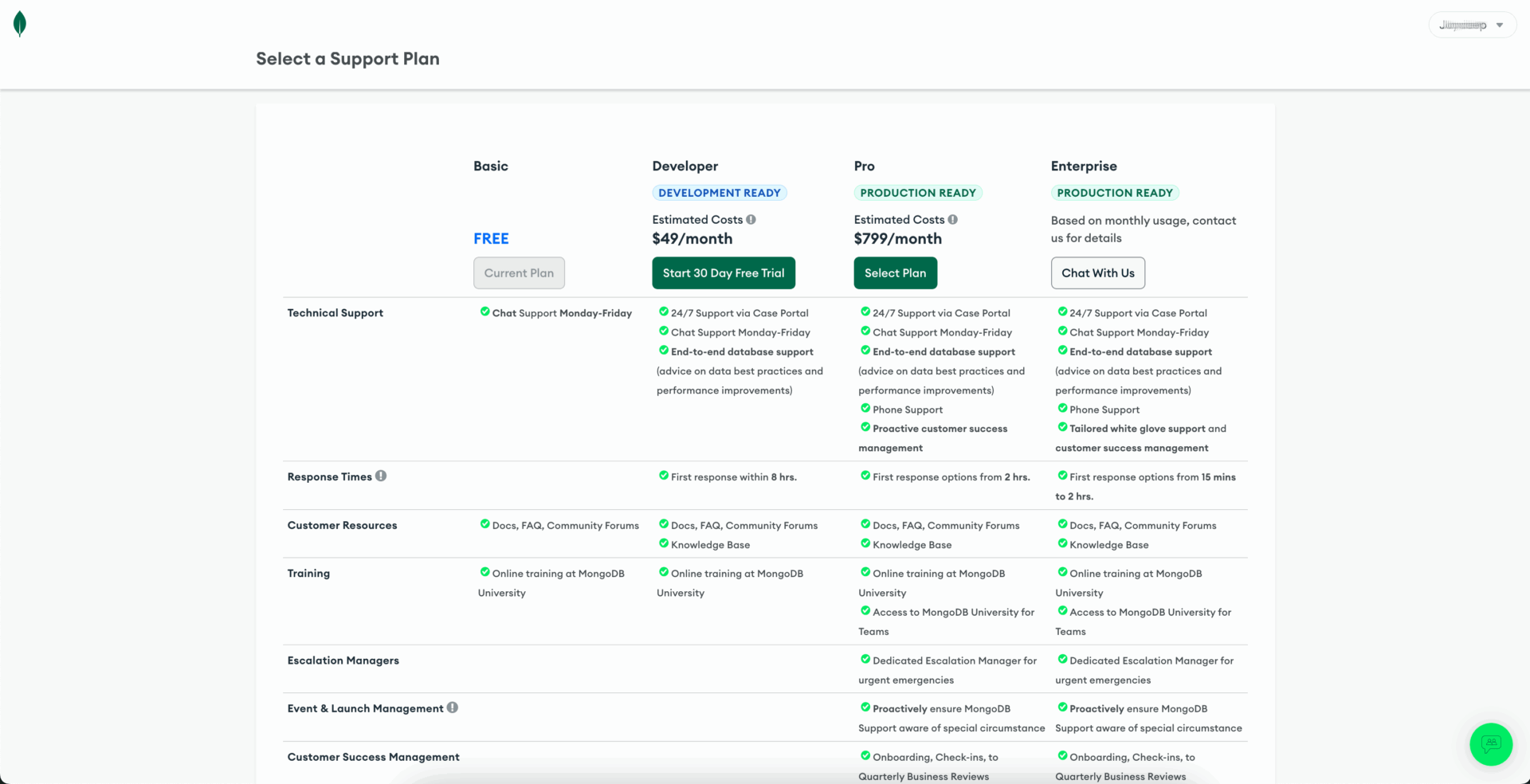
MongoDB® Atlas primarily relies on self-service and community-based support, with premium support tiers available for a fee. While it provides extensive resources, organizations must choose support levels according to their budget and specific requirements.
ScaleGrid for MongoDB®

ScaleGrid emphasizes direct, proactive technical support and expert-driven assistance as part of its standard service offerings. However, the lack of flexibility to downgrade or exclude support may result in higher baseline costs compared to self-managed solutions.
Comparison
ScaleGrid offers a clear advantage in proactive, comprehensive support, making it ideal for organizations lacking extensive internal database expertise or those prioritizing simplicity, reliability, and ease of management.
| Feature | MongoDB® Atlas
(Self-Service) |
ScaleGrid for MongoDB®
(Fully Managed) |
Winner |
| Basic
Tech Support |
Free-tier or basic users provided with community driven resources such as public forums, official documentation with limited direct access to technical staff only possible under premium plans purchased separately. | Integrated, direct access to experts, available by default without additional premium tier requirements. | Tie:
Lower cost vs. support. |
| Premium Tech Support | Multiple paid support tiers (Developer, Pro, Enterprise), providing 24/7 direct technical assistance, response time guarantees (from maximum 8 hours to between 15 minutes and 2 hours), and expert access ranging from $49/mo. to more than $799/mo. | Higher paid support tiers available. The Standard Plan costs 20% of the monthly contract value and guarantees a 1-hour response time during business hours while the Production Plan costs 30% of the monthly contract value and provides 24/7 support with a 15-minute response time. | Tie:
24/7 support for premium options but variable rates and response times vs. top service only with highest premium tier. |
Choose MongoDB® Atlas if you value flexibility in managing support costs, have internal expertise, and are comfortable relying on self-service or community resources, with the option to purchase premium support as needed.
Opt for ScaleGrid if you prioritize rapid, proactive, expert-driven support included in the service, which significantly lowers operational risk, administrative overhead, and resolution time.
Pricing and Cost Structure
Transparent and predictable pricing simplifies budgeting and financial planning.
| Feature | MongoDB® Atlas
(Self-Service) |
ScaleGrid for MongoDB®
(Fully Managed) |
Winner |
| Pricing Model | Flexible, consumption based. | Fixed, time-based. | Tie:
Optimized vs. predictable. |
| Initial Cost | Limited free tier with scalable pricing for higher tiers. | Free 7-day trial with full features, without collection of payment information. | Atlas:
Scaled down but unlimited use vs. full featured but limited use. |
| Support Cost | Premium tiers increase costs based on the responsiveness and expertise level required. | Integrated support at the basic level, with premium tiers available for slightly more. | ScaleGrid:
Optional paid support vs. included at basic level with premium tiers available. |
| Cost Saving Options | All tiers must pay for infrastructure as included. | The Bring Your Own Cloud (BYOC) option saves costs. | ScaleGrid:
All-inclusive infrastructure vs. option to furnish cloud to pay less for service. |
MongoDB® Atlas offers flexibility and potential initial cost savings, but its complexity can lead to unforeseen expenses. ScaleGrid’s straightforward, transparent pricing model appeals to organizations focused on predictable budgeting, comprehensive management, and avoiding unexpected costs. The Bring Your Own Cloud (BYOC) option further reduces expenses by allowing users to manage their own infrastructure.

ScaleGrid offers a large variety of options for MongoDB® on Amazon Web Services.
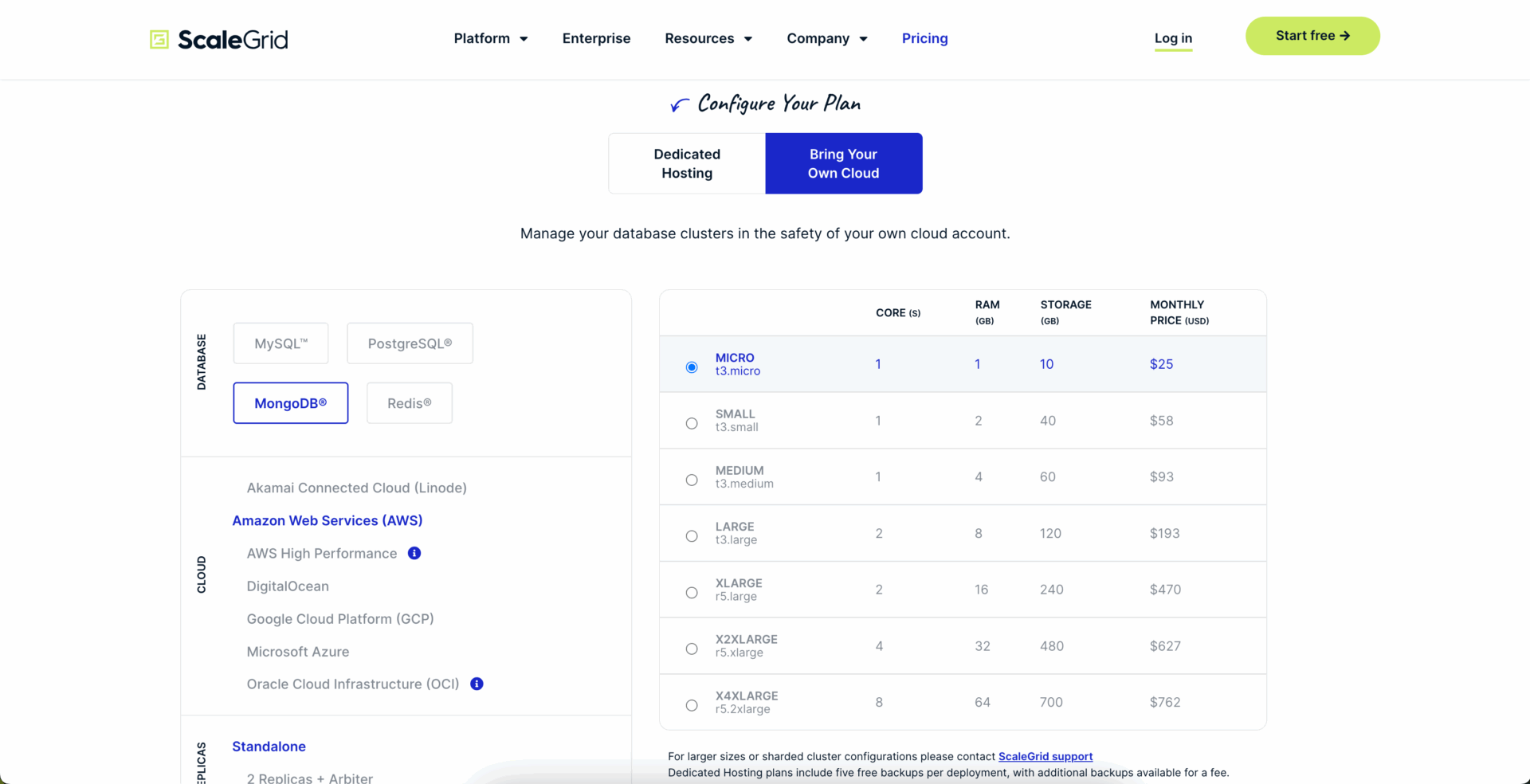
BYOC cuts cost by almost 45% at the lowest tier and by more than 60% at the highest tier.
Ideal Use Cases
MongoDB® Atlas
MongoDB® Atlas suits organizations prioritizing detailed customization, granular control, and flexibility. It benefits those with significant technical resources capable of managing complex integrations and infrastructure.
| Technical Expertise: | Dedicated DevOps teams, infrastructure experts, or skilled database administrators experienced in manual tuning, configuration, and monitoring. |
| Complex Integrations: | Compatibility with third-party tools for monitoring, logging, and analytics (e.g., Datadog). |
| Custom Infrastructure: | Tailored backup strategies, regional deployments, disaster recovery protocols, and compliance policies. |
| Growth Stage & Control: | Emphasis on control, customization, and flexibility in deployment and scaling. |
| Cost Flexibility: | Fine-grained control over resources, with a willingness to manage complex budgeting and forecasting. |
Best Suited For:
- Large-scale e-commerce platforms
- Enterprise SaaS applications
- Specialized enterprises (e.g., FinTech, HealthTech)
ScaleGrid for MongoDB® – an Atlas alternative
ScaleGrid offers simplicity, reliability, predictable costs, and minimal operational complexity through its fully managed service. It appeals to organizations seeking straightforward deployment without extensive administrative requirements.
| Low Database Expertise: | Development-focused teams seeking minimal infrastructure management involvement. |
| Simplicity: | Quick setup, ease of deployment, and usability without extensive configuration or manual optimization. |
| Predictable Costs: | Straightforward monthly pricing without hidden or usage-based expenses. |
| Low Operational Burden: | Automated patching, backups, disaster recovery, security, and proactive monitoring. |
| Support: | Integrated expert assistance with proactive monitoring and responsive support without additional fees. |
Best Suited For:
- All company sizes, from Small and medium-sized businesses (SMBs) to large enterprises
- Mobile and web application developers
- Enterprise SaaS applications
- Specialized industries (e.g. FinTech, Healthcare)
- Use cases requiring close proximity of data to the consumer e.g. streaming
- Use cases with strict data sovereignty requirements e.g., online gaming
- Hosting companies and MSPs looking to provide Database-as-a-Service capabilities to their customers.
- Organizations that want the ability to continue to use legacy versions of MongoDB®.
Conclusion
While MongoDB® Atlas provides detailed monitoring and performance optimization options, ScaleGrid does this and more at a lower cost. Additionally, MongoDB® Atlas typically requires manual setup and extensive configuration, whereas ScaleGrid streamlines this process through automation and an intuitive interface, significantly reducing complexity and saving valuable time.
Furthermore, ScaleGrid provides support for a wide range of cloud options catering to both small and large organizations. This includes Bring Your Own Cloud (BYOC), allowing users to manage their infrastructure flexibly. Such flexibility is especially beneficial to large organizations aiming to focus their IT resources on cloud engineering while delegating database management to a responsive, professional team with innovative software management solutions.
Another important benefit of the ScaleGrid platform is its support for end-of-life versions of MongoDB® . Atlas regularly discontinues support for older versions, compelling customers to upgrade. In contrast, ScaleGrid supports MongoDB® versions as far back as 2.6.11, ensuring continuity of service without unnecessary disruptions. Taken together, these advantages make ScaleGrid a compelling and cost-effective choice for organizations seeking flexibility, simplicity, performance, and long-term reliability in their MongoDB® deployments.
Summary Comparison Table
| Feature | MongoDB® Atlas
(Self-Service) |
ScaleGrid for MongoDB®
(Fully Managed) |
Winner |
| Ease of Setup and Deployment | Complex and manual configuration of cluster setup, region selection, and user permissions. | Simple and guided setup and deployment with default configurations. | ScaleGrid:
Complex vs. simple. |
| Management and Maintenance | Manual management of patching, updates, and scaling. | Automated management of patching, updates, and scaling. | ScaleGrid:
Manual vs. automated. |
| Backup, Disaster Recovery, and Security | Manual scheduling and configuration of backup, disaster recovery, and security settings. | Automated backup and disaster recovery with managed security. | ScaleGrid:
Self-service vs. managed. |
| Monitoring and Alerts | Highly customizable but requiring manual setup and third-party service integrations. | Proactive monitoring and automated alerting. | Tie:
Customizable vs. integrated. |
| Performance and Scalability | Manual tuning required with advanced scaling controls available but requiring expertise. | Professionally managed optimization and scaling. | Tie:
Optimizable vs. managed. |
| Technical Support and Customer Service | Free community support with paid premium tiers for direct professional technical support. | Included direct expert technical support with proactive management with optional upgrade. | Tie:
Flexibility vs. inclusiveness. |
| Pricing and Cost Structure | Variable, consumption-based pricing with lower initial costs. | Fixed monthly pricing with Bring Your Own Cloud (BYOC) option for additional savings. | ScaleGrid:
Unpredictable yet rigid vs. predictable yet flexible. |